Retouch 10x Faster
And Get Your Nights Back
This Photoshop panel handles skin retouching, blemish removal, color grading, gel lighting, overlays and smart export. One click each, with pores and texture kept in every photo.
One-time payment · Lifetime access · Works with Photoshop CC (Mac & PC)
✓ Test it on 3 photos. Money back if it's not faster.
The problem
Retouching by hand eats your whole night
Tell me if this sounds familiar.
The shoot is over. The gallery looks great. Then you sit down with 400 photos and you start on the skin.
One face. Then the next face. Spot healing. Dodge and burn. Forty minutes gone and you are still on photo two.
So you tell the client two weeks and it turns into five. You edit until 2am and get up for a shoot at 7. You start turning down bookings because you cannot face the retouching that comes with them.
Then you try the tools that promise to fix it. They make it worse. The skin comes out melted. Pores gone, freckles gone, every face looking like plastic. You cannot send that to a client, so you go back to doing it by hand, and you keep losing your nights.
That is the trap. The slow way costs your nights. The fast way costs the skin. Nobody had built the tool that refuses to pick one.
So we built it. Every tool a portrait needs, sitting in one panel inside Photoshop, one click each, with the texture still there.
That panel is BLOOM.
See the difference
Same photo. 60 seconds apart.
Every result below was made in under 60 seconds in BLOOM. No manual masking. No layer stacking. No hours in Photoshop.
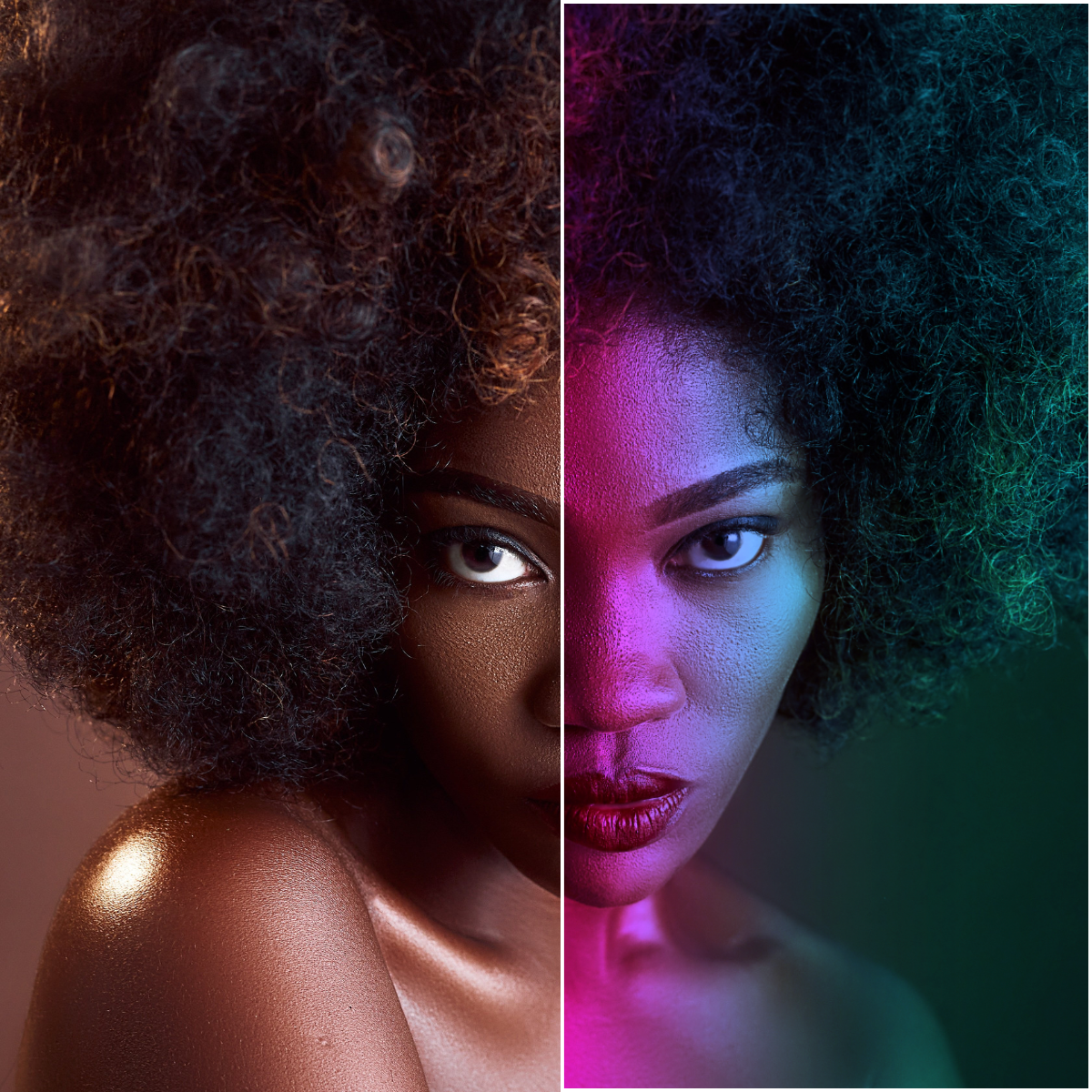
Neon Split preset · One click
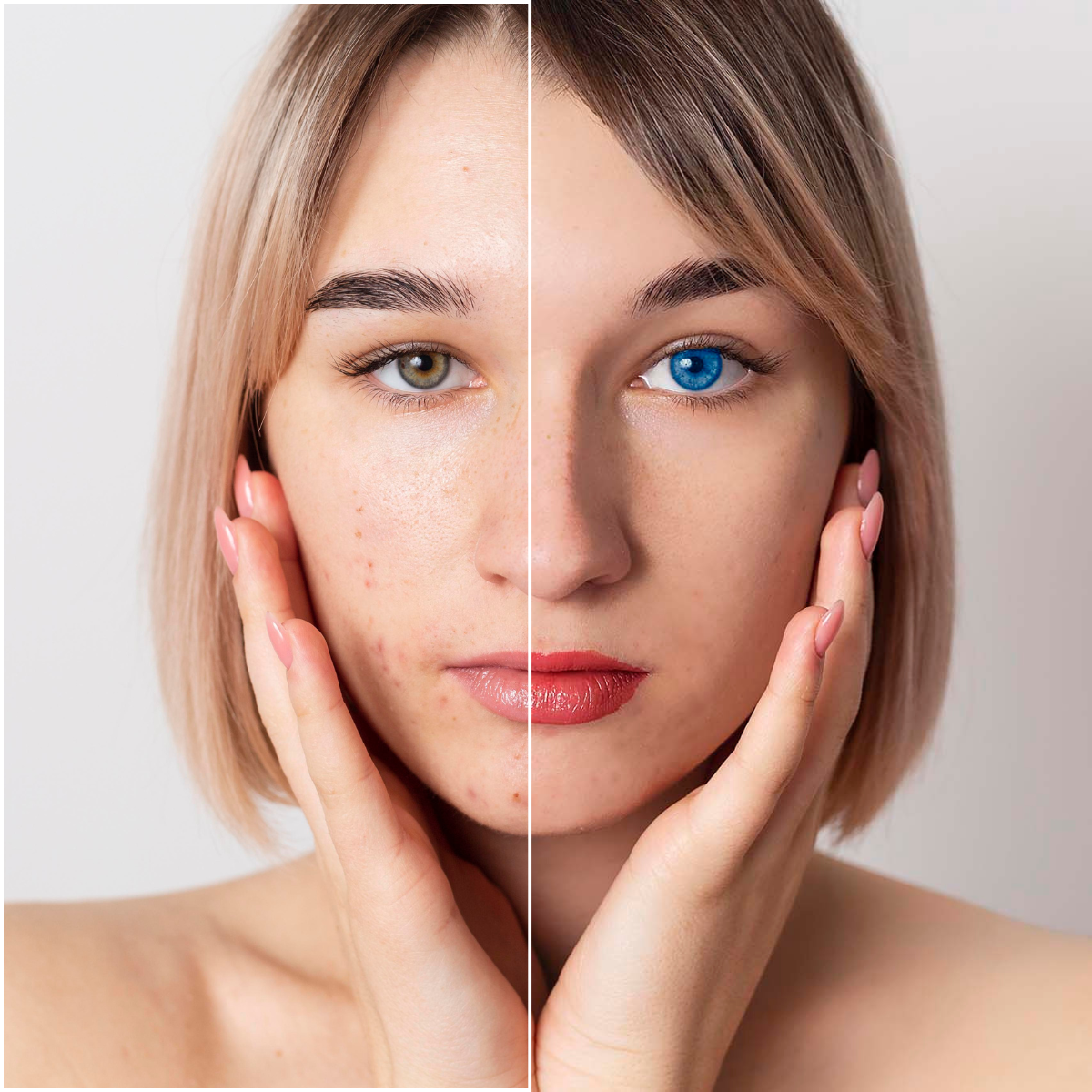
Texture kept fully intact · Under 60 seconds
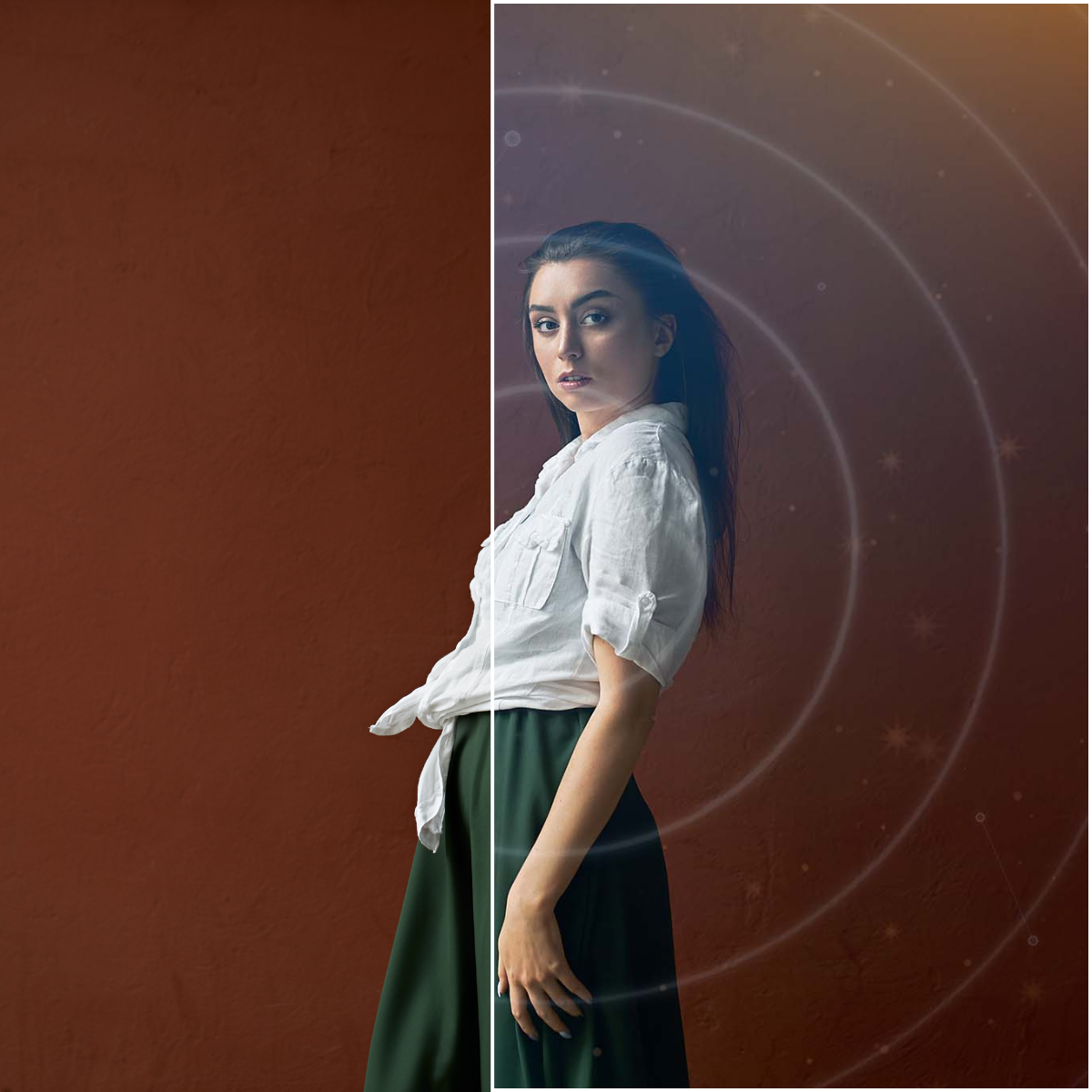
Light leaks · Auto Screen blend
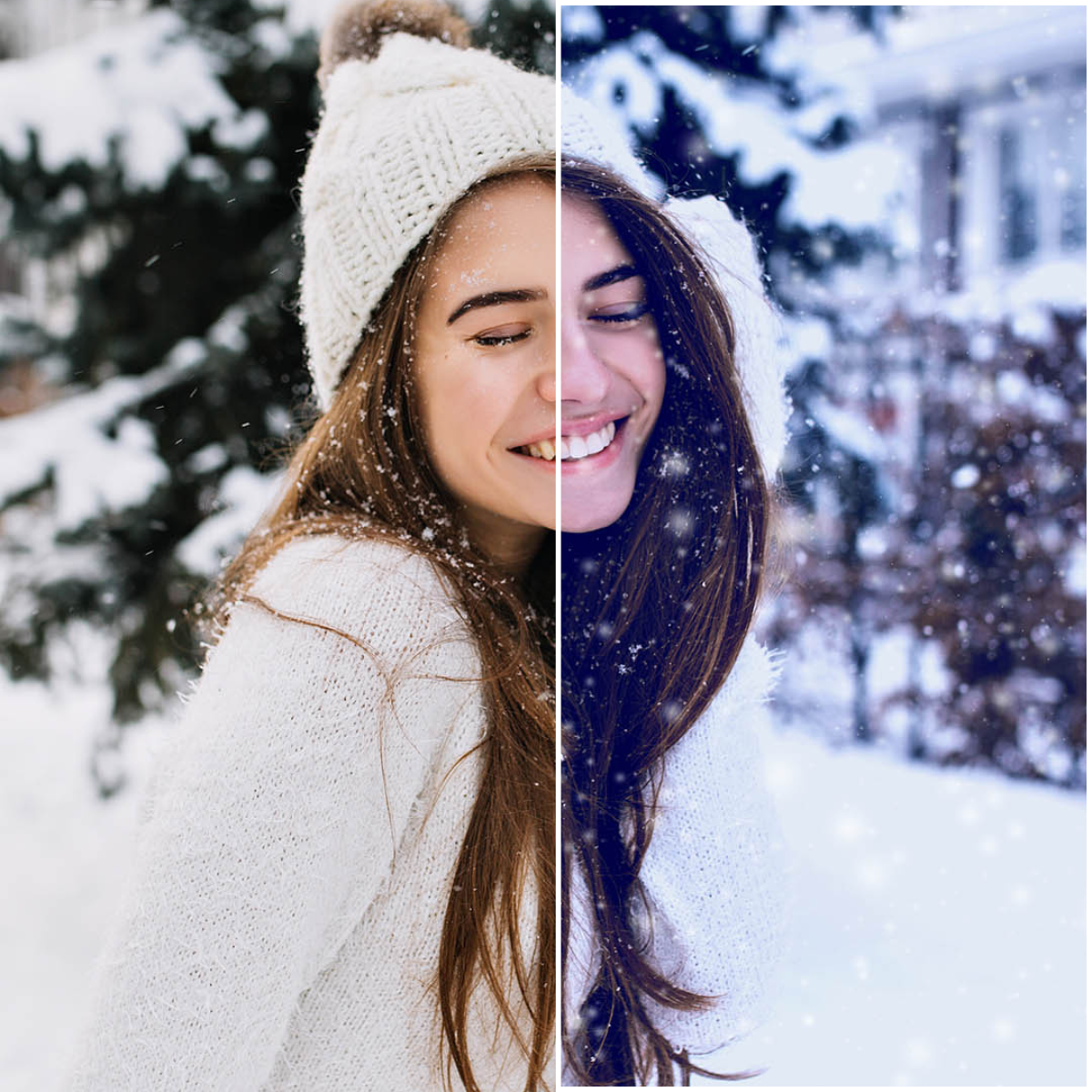
Snow overlay · Stackable, flip + rotate
🌸 V2 Pricing
Get BLOOM · $75 · Yours For LifeOne-time payment · Rises to $95 when v3 releases · Money back if it's not faster
What BLOOM does
Every tool you need.
One panel.
Remove every blemish, never the texture
Tap apply, then brush over any spot. BLOOM heals it instantly while keeping your skin texture real. No plastic look, no pixel-peeping, no manual spot healing.
- Brush over a blemish and watch it disappear
- Keeps pores and texture fully intact
- Redness control for flat red marks and irritation
- Intensity slider to dial the heal strength
- Every effect lands on its own layer, so nothing is baked in
Retouch professional skin, in one click
BLOOM's AI automatically detects skin, applies Surface Blur, and creates a precise mask, excluding eyes, lips, hair, and clothing. What used to take 15 manual steps now takes one.
- AI-powered skin detection, no manual selection needed
- Surface Blur preserves edges, avoids the plastic look
- Frequency Separation for professional-grade retouching
- Eyes, lips, and teeth tools included
- Every effect lands on its own layer, so nothing is baked in
Perfect every detail, eyes, lips and teeth
From bloodshot veins to dull teeth, BLOOM handles all the fine detail work that separates a good portrait from a great one.
- Eye vein removal, two-step color and line correction
- Eye whitening, color change and Catchlight AI
- Black pupil enhancement for depth and definition
- Teeth whitening targeting yellows only, no skin bleed
- Lip color, lip gloss, and lips dodge and burn
Get instant cinematic looks, in one preset
Each preset is a professionally crafted stack of Curves, Color Balance, and Hue/Saturation layers, tuned to look like real film and real light.
- Spring, Summer, Autumn, Winter, Golden Hour, Film, Moody, B&W
- Intensity slider to dial the look from subtle to dramatic
- Fully editable layer groups, tweak any preset
- One click replaces, never accidentally stacks
Transform backgrounds, never the subject
BLOOM's AI isolates your subject automatically, then lets you blur, brighten, darken, or completely stylize the background.
- Background Blur for fake shallow depth of field on any photo
- Luminance to make backgrounds darker or brighter independently
- 6 Artistic Filters including Oil Paint, Watercolor and Stained Glass
- Subject always protected, AI mask applied automatically
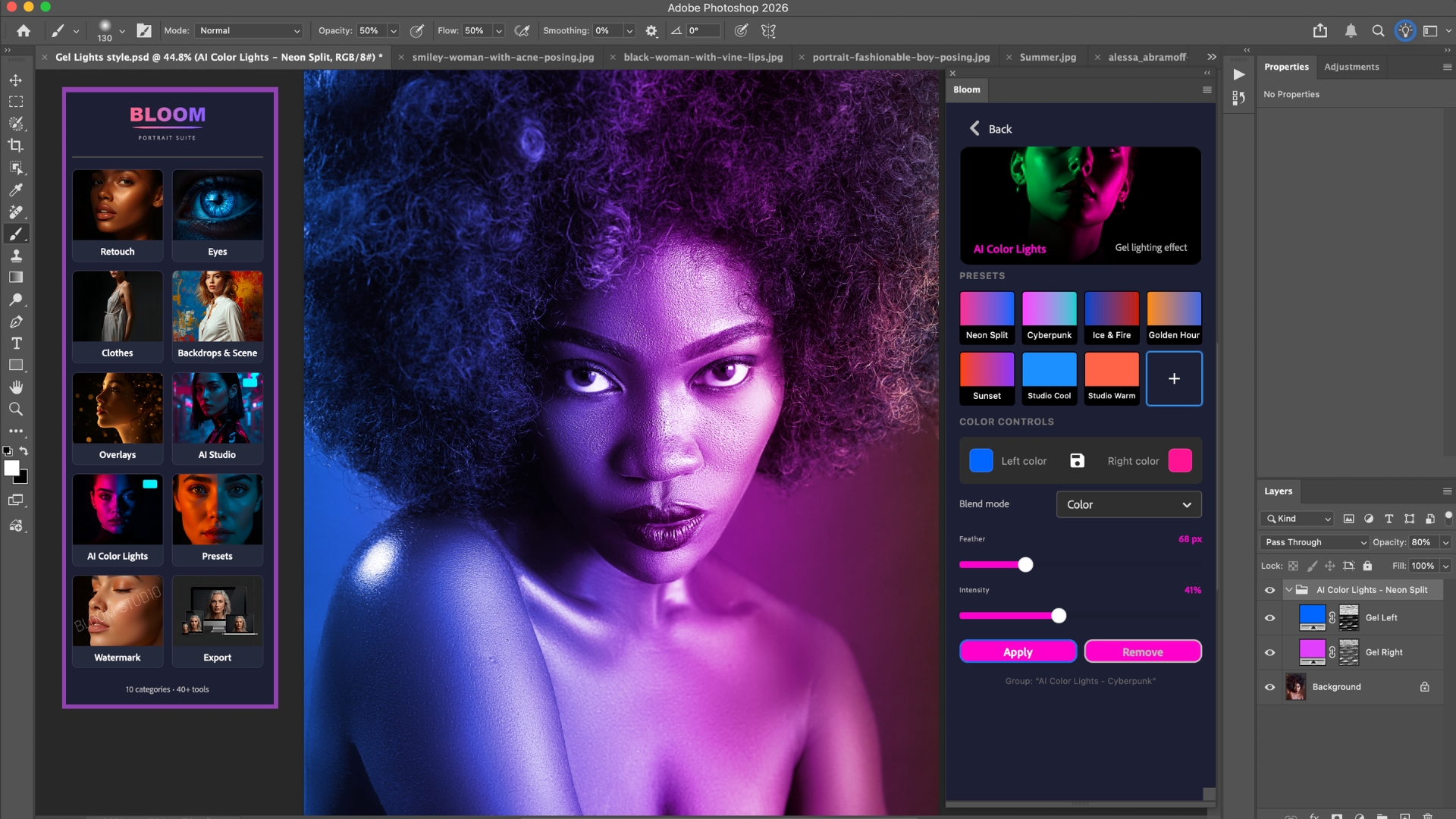
Add studio gel lighting, in one click
The neon split look that dominates Instagram and Reels used to require a full studio setup or an hour of Photoshop work. BLOOM does it in one click.
- 7 preset gel combos including Neon Split, Cyberpunk and Ice & Fire
- AI detects the subject automatically, no manual selection
- Custom color picker to choose any two colors
- Multiply, Soft Light and Color blend modes
Get 20+ overlays, one click each
Bokeh, sparkle, snow, rain, light leaks, fog, drop any of them onto any photo. BLOOM places it on a new layer and sets Screen blend mode automatically.
- 20 overlays across 6 categories, Snow, Rain, Bokeh, Light Leaks, Fog and Sparkle
- Screen blend mode applied automatically
- Stackable, combine snow, bokeh and fog together
- Flip and rotate controls built in
🌸 V2 Pricing
Get BLOOM · $75 · Yours For LifeOne-time payment · Rises to $95 when v3 releases · Money back if it's not faster
Simple by design
How BLOOM works
Open your photo
Open any photo in Photoshop. Open the BLOOM panel from the Plugins menu. That's your entire setup.
Click what you need
Skin retouch. Color grade. Overlay. Background blur. Gel lighting. One click per feature. BLOOM handles the rest.
Export in one click
Click Instagram, Facebook, Client Gallery, or Print. BLOOM resizes, sharpens, and saves automatically.
Everything included
One plugin. Your entire workflow.
AI Skin Retouching
Auto Skin Retouch + Frequency Separation + Hair Removal + Dodge & Burn
4 toolsLips & Teeth
Teeth Whitening + Lip Color + Lip Gloss + Lips Dodge & Burn
4 toolsEyes
Vein Removal + Eye Whitening + Color Change + Catchlight AI + Final Touch
5 toolsClothes
Wrinkle Removal + Color Change (Colored & White clothing methods)
2 toolsAI Scene
Background Blur + Luminance + Stylize Filters + Background Color
4 toolsAI Gel Lighting
7 Preset combos + Custom colors + Blend mode control
7 presetsColor Grading
Spring, Summer, Autumn, Winter, Golden Hour, Film, Moody, B&W
8 presetsOverlays
Snow, Rain, Bokeh, Light Leaks, Fog, Sparkle, all stackable
20 includedSmart Export
Instagram, Facebook, Web, Client Gallery, Print Ready, one click each
5 presets🌸 V2 Pricing
Get BLOOM · $75 · Yours For LifeOne-time payment · Rises to $95 when v3 releases · Money back if it's not faster
The difference
Why photographers switch to BLOOM
Same Photoshop. Same photos. A completely different night.
| Retouching By Hand | BLOOM | |
|---|---|---|
| Retouching Method | ✕Layers, masks and frequency separation, face by face | ✓One click per feature, in a panel inside Photoshop |
| Time Per Photo | ✕30 to 45 minutes | ✓Under 60 seconds |
| Skill Needed | ✕Years of Photoshop practice | ✓If you can click a button, you can use it |
| Skin Texture | ✕Easy to overdo, skin ends up plastic | ✓Real pores, freckles and fine lines stay |
| Full Gallery Consistency | ✕Every photo matched by hand, one at a time | ✓The same look across the whole gallery |
| Your Edits Later | ✕Changes get flattened, so you start over | ✓Every effect on its own layer, turn it off any time |
| What It Costs You | ✕A full night after every wedding | ✓$75 once, yours for life |
Swipe to see the full table →
What our customers say
"I shoot weddings and retouching was always the nightmare. BLOOM cut my retouching time in half. The AI skin retouch is genuinely impressive, it knows exactly what to touch and what to leave alone."
"The AI scene tools are what got me. I had a shoot where the background was completely blown out. Background blur, luminance, one of the stylize filters, fixed in under two minutes. I would have spent an hour on that manually."
"I've tried a lot of Photoshop plugins. Most feel like they were built by developers who don't actually shoot. BLOOM feels like it was built by a photographer. The workflow makes sense and the results hold up at full resolution."
Get BLOOM today
Pay once. Keep it forever.
BLOOM Full Plugin · Lifetime
Retouch4me charges $124 for skin retouching alone. Evoto runs on credits, so you pay again for every photo you export. BLOOM has no credit system. Every tool, one payment, yours for life.
Price rises to $95 when v3 releases
$75
One-time payment · Lifetime access · Never pay again
- ✓ AI Skin Retouching (Auto + Frequency Separation)
- ✓ Blemish Removal with texture-safe healing
- ✓ Eyes, Lips & Teeth tools
- ✓ Clothes Wrinkle Removal & Color Change
- ✓ AI Scene: Blur, Luminance, Stylize Filters
- ✓ AI Gel Color Lighting: presets + custom
- ✓ Color Grading Presets
- ✓ 20 Overlays (Snow, Rain, Bokeh, Sparkle, Fog, Light Leaks)
- ✓ Smart Export: Instagram, Facebook, Print & more
- ✓ Every effect sits on its own layer, so you can turn it off, dial it back, or delete it at any time. Your original photo is never changed.
- ✓ Works with Photoshop CC: PC & Mac
- ✓ All photos processed locally. Nothing uploaded, no credits, no limits
- ✓ Lifetime access: pay once, use BLOOM forever
✓ Test It On 3 Photos. Money Back If It's Not Faster.
Here's how it works. Buy BLOOM, add it to Photoshop, and retouch any 3 portraits within your first 30 days. If BLOOM doesn't make your retouching faster than the way you edit now, email those 3 photos to support@bloomretouch.com and we refund your full $75. The photos are simply your proof that you gave it a real try. And if you can't get BLOOM added and running within 10 minutes, we'll jump on a screen share and set it up with you personally.
🔒 Instant download · One-time payment · Money back guarantee
Frequently asked questions
What if BLOOM doesn't work for me?
You get 30 days to test it on your own photos. Retouch any 3 portraits with BLOOM. If it doesn't make your retouching faster than your current workflow, email those 3 photos to support@bloomretouch.com and we refund your full $75. We ask to see the photos so we know you actually tried it, and so we can see what went wrong on our end.
Do I ever pay again?
No. BLOOM is a one-time payment of $75. No yearly renewal, no monthly subscription, no credits, no per photo charges. You pay once and it's yours for life.
What does non-destructive actually mean?
It means BLOOM never changes your original photo. Every effect goes onto its own named layer sitting above it. So you can turn any effect off, lower its opacity, or delete it completely, even days later, and your original file is still exactly as you shot it. Nothing is ever baked in.
How is BLOOM different from Retouch4me or Evoto?
Three ways. First, texture. BLOOM keeps real pores, freckles and fine lines instead of the plastic AI look. Second, pricing. Retouch4me sells every tool as a separate plugin, and Evoto runs on a credit system where you pay again for every photo you export. BLOOM has no credits and no per photo charges. Every tool is included in one payment. Third, privacy. BLOOM runs entirely inside Photoshop on your own machine, so your client photos are never uploaded anywhere.
Do my photos get uploaded to the cloud?
Never. Everything BLOOM does happens locally, inside Photoshop, on your computer. No uploads, no cloud processing, no export limits. Your client photos stay yours.
What version of Photoshop do I need?
BLOOM works with Adobe Photoshop CC 2021 and later on both Mac and PC. It does not work with older CS versions or Photoshop Elements.
How long does setup take?
Under 3 minutes. Double-click the file, Creative Cloud adds it automatically, and BLOOM appears in your Plugins menu. And if you get stuck, we'll screen share and set it up with you personally.
I'm not a professional photographer. Will BLOOM work for me?
Yes. BLOOM was built specifically to make professional retouching accessible without professional-level Photoshop knowledge. If you can open a photo and click a button, you can use BLOOM.